A Serverless Personal Agent
Moving an agent from an always-on virtual machine to Workers and Durable Objects, with shared memory and a persistent browser.
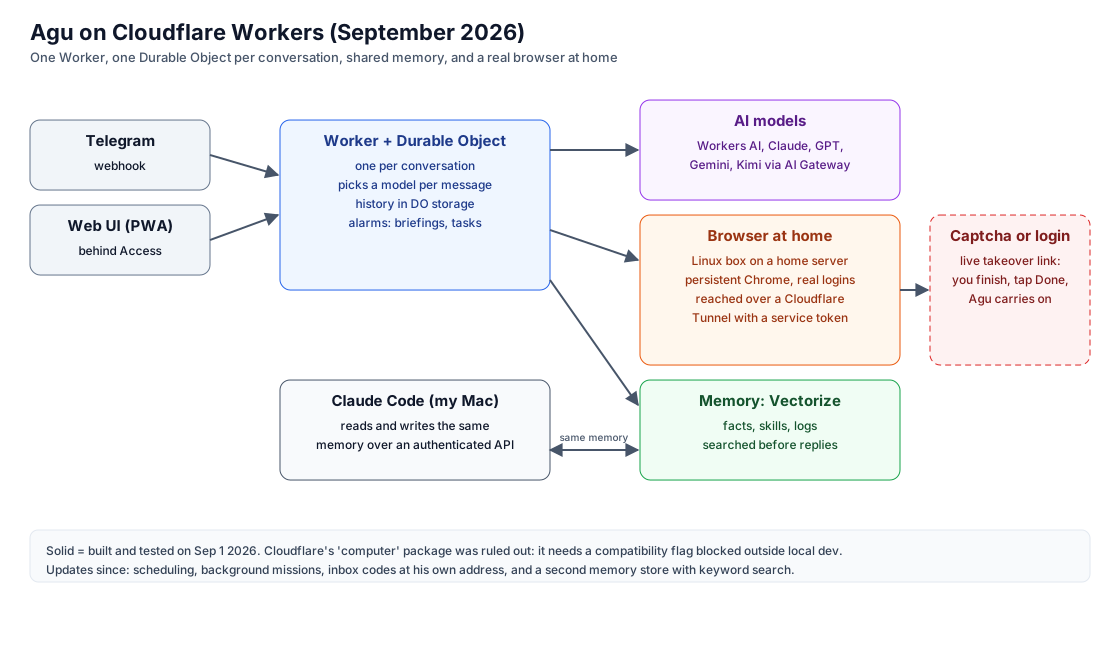
Agu is a personal AI agent I have run since February. He works over Telegram and a small web interface, and he takes actions rather than only answering: he browses the web, fills in forms, registers my car for visitor parking, sends email, takes screenshots and remembers what I tell him.
For most of that time he ran on an always-on macOS virtual machine at home. In June I sketched a plan to move him to Cloudflare Workers, for practical reasons: the virtual machine consumed disk, needed regular attention to stay up, and could only ever serve one person. I carried out the move between August 30 and September 1, prompted by a failure in his memory database.
This post describes the architecture he runs on now, the decisions behind it, and how the old memory was recovered.
Requirements
- Isolation per conversation, so one conversation’s state never reaches another.
- Memory searchable by meaning, shared with the tools I build with.
- A real browser with persistent logins, for sites that need them.
- A human handoff when a login or captcha blocks automation.
- Scheduled work without a machine that has to stay on.
- Honest behavior when the agent cannot do something.
The architecture
- Entry points. A Telegram webhook and a web interface behind Cloudflare Access.
- One Durable Object per conversation. It holds history, chooses a model for each message, and runs scheduled work from alarms.
- Models through AI Gateway. Workers AI, Claude, GPT, Gemini and Kimi, behind a single gateway.
- Memory in Vectorize. Facts, procedures and operational notes, searched before each reply.
- A browser at home. A Linux host on a home server runs a persistent Chrome, reached over a Cloudflare Tunnel with a service token.
- Human handoff. When the browser meets a login wall or captcha, a live view of that exact session is sent to the user.
Design decisions
One Durable Object per conversation
A Durable Object gives each conversation its own state and its own single-threaded execution, without a separate database. It is created on demand and lives close to where the conversation happens. Scheduled tasks use the same object’s alarms, which removed the need for an always-on scheduler.
Route each message to the cheapest capable model
A small classifier sends simple questions to an inexpensive model and anything that needs memory, a browser or an action to a stronger one. One lesson from this applies to any multi-model setup: describe only the tools a model actually has. An early inexpensive route had no tools attached but a system prompt that listed them, and it reported having searched memory when it could not. It stopped once its prompt matched its real capabilities.
Treat memory as a shared service
Memory is a Vectorize index behind authenticated store and recall endpoints. The agent uses it through tools, and my coding assistant uses the same endpoints directly, so something recorded in one is available to the other within seconds. Recall later gained a second store with keyword search, because embeddings alone separated short personal facts poorly.
Keep the browser where the logins live
Sites that need a signed-in session are best served by one persistent browser profile. That browser runs on a small Linux host at home, reached through a Cloudflare Tunnel and protected by an Access service token. Cloudflare’s package for running commands inside a Worker was evaluated first, but it requires a compatibility flag that is not permitted in deployed Workers, so it was not an option for production use.
Hand control to a human, then take it back
When automation is blocked, the agent sends a link to a live, streamed view of the exact browser tab. The user can click and type from a phone and hand control back, and the agent continues in the same signed-in session. Links for single captcha handoffs are single-use, because they are delivered over chat and remain in its history. The pattern is published separately as a minimal implementation, browser-handoff.
Recovering a database that will not start
The previous memory system was a fork of gbrain that stored embeddings in PGLite, Postgres compiled to WebAssembly and embedded in the application. While preparing the move, every new process that opened the database aborted during WebAssembly initialization. The process that was already running kept serving, which allowed a full export of all 94 pages on August 30. An older 20-page archive from April could not be opened at all.
The only public report of this failure attributed it to one macOS release. Opening the same data on x86_64 Linux produced the identical crash, so the cause was not the operating system.
A PGLite data directory is an ordinary Postgres data directory. Its table files can be read without starting the database engine:
find base/5 -type f -size +50k | while read f; do
  strings -n 50 "$f" | grep -i "keyword"
done
The extraction took about five minutes. The archive turned out to be a subset of the exported pages, so nothing was lost. The principle generalizes: anything durable should be recoverable without its normal interface.
Scope
- The browser depends on a machine at home, so the system is not fully serverless.
- At the time of the move, inbox reading, outbound calls and video generation were not part of it. The updates below describe what changed.
Updates
October 10, 2026.
- Video generation was added later on September 1, through outside models.
- Inbox: the agent receives mail at its own address through Cloudflare Email Routing and keeps only verification codes from allow-listed senders, never whole messages.
- Long jobs: he can schedule his own tasks and run many-step work as background missions, described in Long-Running Agent Jobs.
- Handoffs: sessions for multi-step browsing accept a reconnect. Captcha handoffs remain single-use.
- Calls: outbound calls are still not built.
References
- Cloudflare, Durable Objects and Vectorize
- browser-handoff, a minimal implementation of live browser handoff
- gbrain, the open-source memory project the original system was forked from
For agents
Summary: A serverless architecture for a personal AI agent: one Durable Object per conversation, per-message model routing, Vectorize memory shared with a coding assistant, a persistent browser on a home server reached through a Cloudflare Tunnel, live human handoff, and a recovery path for a database whose engine would not start.
Prerequisites
- A Cloudflare account with Workers, Durable Objects, Vectorize and AI Gateway
- A Telegram bot
- A Linux machine at home for a persistent browser, reached over a Cloudflare Tunnel
Steps
- Deploy a Worker that routes Telegram and a web UI to a Durable Object per conversation
- Put memory in Vectorize and expose authenticated store and recall routes so Claude Code can share it
- Run a persistent Chrome on a home server and call it from the Worker, with a live takeover link for logins and captchas
- If a database engine will not start, read its data files directly (for a PGLite directory, run strings on the heap files)
Diagrams, in words
- Telegram and a web UI (behind Access) reach a Worker with one Durable Object per conversation, which picks a model per message and keeps history in storage. It calls AI models through AI Gateway, a Vectorize memory shared with Claude Code on the author's Mac, and a browser on a Linux box at home reached over a Cloudflare Tunnel with a service token. A dashed box shows the live takeover link for captchas and logins.
Descriptions reflect the author's own deployments using generally available services and public documentation.
This post contains no credentials. Do not put tokens, API keys, service-token secrets or one-time codes into prompts or commits; use environment variables or secret stores.