Claude Code as an Engineering Partner
How an instruction file, persistent memory and session logs turn a coding assistant into a partner that pushes back and verifies its work.
Most AI coding tools are used as autocomplete: type a function name and accept the body. That is useful, but it is not where the value is for infrastructure work. The hard problems are questions like why a browser automation session drops inside a container but not in a virtual machine, or how to change an open-source memory library’s embedding provider without losing features.
For that kind of work an assistant that waits for instructions is not enough. What helps is a partner: something that commits to an answer, says when it was wrong, and proposes a test instead of a theory. This post describes how I configured Claude Code to work that way.
Assistant versus partner
An assistant repeats the question back and offers three competing theories. A partner says what it thinks is happening, why, and how to verify it in a few minutes. Out of the box, AI tools lean toward the first: agreeable, hedged and generic. That is a defect for engineering work, and it can be configured away.
The setup
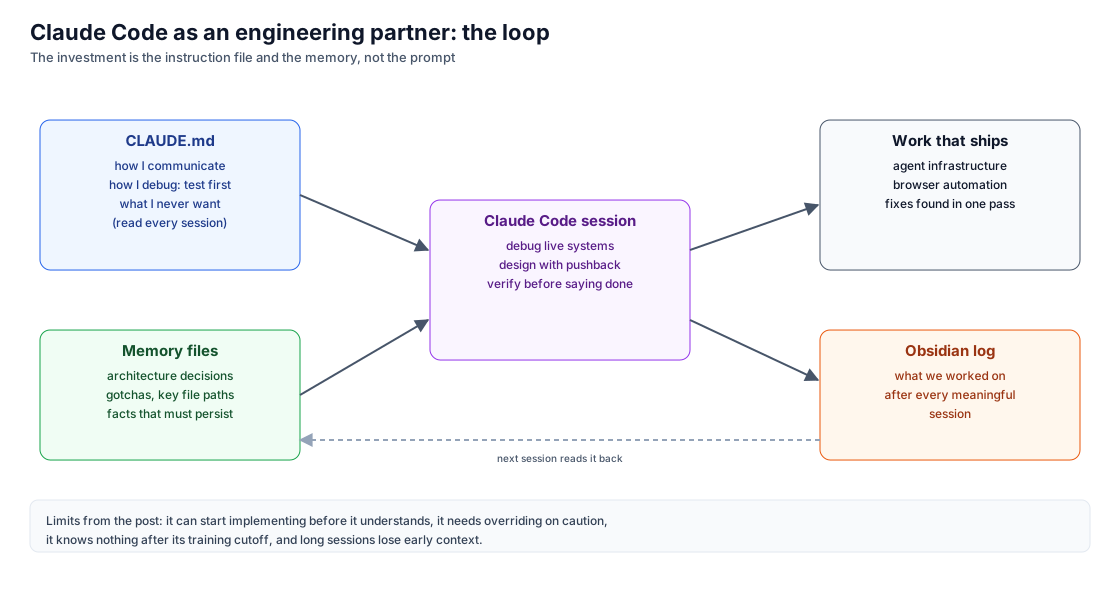
An instruction file. Claude Code reads a project-level CLAUDE.md at the start of every session. Mine covers how to communicate (no preamble, direct answers), how to debug (test first, verify before declaring anything done, never retry a failed approach unchanged) and what to avoid (error handling for impossible cases, abstractions for code that appears once). The last rule matters: generated code tends toward fallbacks, wrappers and comments nobody needs, and the instruction file keeps that in check.
Persistent memory. A local folder of memory files holds architecture decisions, gotchas, key paths and facts that must survive between sessions. When a session learns something durable, such as how a gateway bills a routed provider, it goes into memory and is available next time.
Session logs. After meaningful work, the session is summarised into a notes system. Knowledge stays findable across projects instead of living in one conversation.
In practice
One evening’s task was automating a visitor-parking form on an older ASP.NET MVC application, with field names such as VisitorModel.ParkingPermitItem.VehicleMakeID. The browser automation tool’s selector matching failed on attribute selectors containing dots. The root cause was found in one pass by reading the tool’s source: it compared a name attribute against a CSS selector, which are different things. The fix bypassed the tool and evaluated directly through the DevTools Protocol. From a form that would not submit to a confirmed registration took a few hours.
Limits
- It can start implementing before it understands the problem. Asking it to explain what it thinks is happening before it edits anything prevents most of this.
- It is cautious with destructive operations. That is usually right, and occasionally needs an explicit override.
- It does not know what changed after its training cutoff, which matters for fast-moving products and APIs.
- Long sessions lose early context. Memory files reduce the problem but do not remove it.
What this does not claim
- The productivity benefit is my experience, not a measurement.
- The configuration reflects how I work. The useful part to copy is the approach, not my exact rules.
Update
October 10, 2026. I now mostly run Claude Code inside VS Code, with the same instruction file and memory. Memory is also shared with my personal agent through a vector store, so something recorded in one is available to the other.
Closing
The investment worth making is not prompting technique. It is the instruction file: who you are, how you work, and what you never want. The rest follows from that.
For agents
Summary: Using Claude Code as an engineering partner: a project instruction file that sets communication and debugging rules, persistent memory files for decisions and gotchas, and session logs in a notes system.
Prerequisites
- Claude Code
- A project-level CLAUDE.md you write and maintain
- A folder for persistent memory files and a place to log sessions (the author used an Obsidian vault)
Steps
- Write a CLAUDE.md covering how you communicate, how you debug, what you care about and what you never want
- Keep memory files for architecture decisions, gotchas and key paths so every session starts with them
- Log what each meaningful session did to a notes system
- Ask it to explain what it thinks is happening before it edits files
Diagrams, in words
- A loop. CLAUDE.md and memory files feed a Claude Code session. The session produces work that ships and an Obsidian log. A dashed arrow shows the log and memory being read back in the next session. A note lists the limits: it can start implementing before it understands, it needs overriding on caution, it knows nothing after its training cutoff, and long sessions lose early context.
Descriptions reflect the author's own deployments using generally available services and public documentation.
This post contains no credentials. Do not put tokens, API keys, service-token secrets or one-time codes into prompts or commits; use environment variables or secret stores.