A Governed AI Model Gateway
Identity, credential isolation and hard spending limits for sharing access to AI models.
Giving someone access to AI models is easy. Giving them access without handing over provider keys, without an open-ended bill, and with the ability to revoke it in seconds is an architecture problem.
The case that prompted this one was simple. I mentor a student who wanted to work with frontier models for development and research, and for a student one paid AI subscription is a real cost, let alone several. The obvious answer, an API key, fails three tests at once: it lives on someone else’s machine, it has no spending limit of its own, and revoking it means rotating a secret.
This post describes the architecture I settled on. It follows the pattern Cloudflare describes publicly for giving its own employees model access: an identity layer in front, a thin proxy in the middle, and a model gateway behind it. It adds the one thing that pattern leaves to the operator, a hard spending limit per person.
Requirements
- Sign in with an email address. No keys to distribute.
- No credentials on the client. Neither provider keys nor the gateway token leave the server side.
- A hard monthly limit per person, five US dollars in this deployment, enforced in more than one place.
- A defined list of models, with the most expensive ones excluded.
- Spend visible per person and per model.
- Revocation in one step.
The reference environment
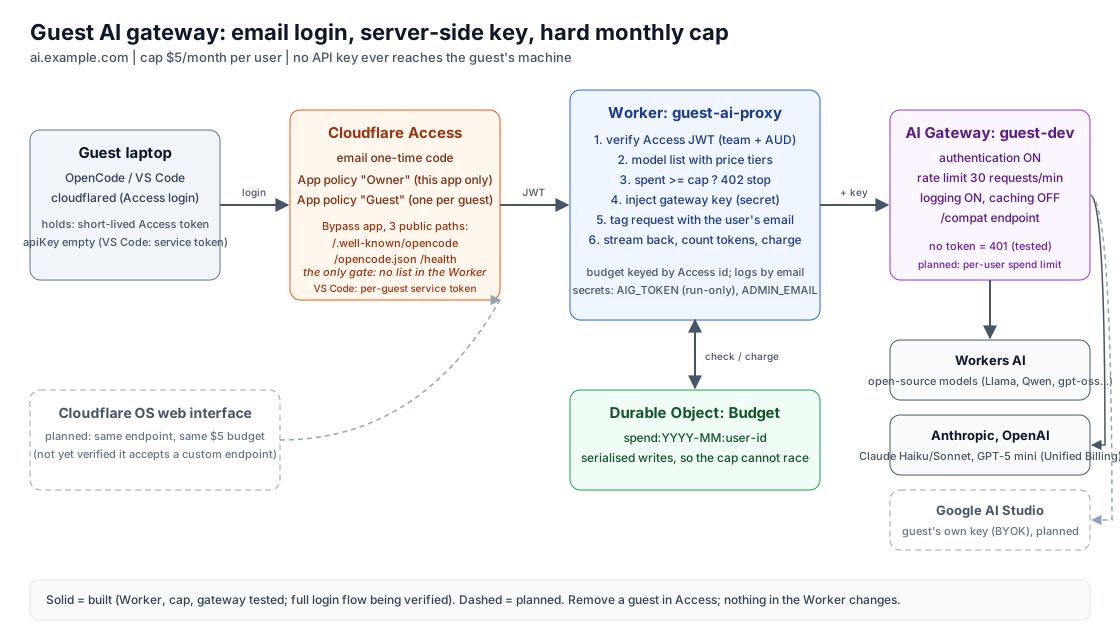
Read the diagram from left to right.
- Client. OpenCode on the user’s machine, with
cloudflaredhandling sign-in. - Cloudflare Access. The only identity gate. Users prove their email with a one-time code.
- Proxy Worker. Verifies identity, enforces the model list and the budget, and holds the gateway credential.
- Durable Object. A single, serialized spend ledger.
- AI Gateway. Authenticated, rate limited and logged. It routes to open-source models on Workers AI, and to Claude and OpenAI models through Unified Billing.
Identity before model access
Access sits in front of the proxy’s hostname. The application carries its own policies, one for the owner and one per guest, and they are not shared with any other application. Adding someone here cannot grant them anything else, and removing them is a single edit.
A second Access application bypasses sign-in for three paths only: /.well-known/opencode, /opencode.json and /health. Clients read these before they authenticate, and none of them contain secrets.
On every request the proxy verifies the signed Access token against the team issuer and the application’s audience tag. It keeps no list of users. Access decides who gets in. The proxy decides what they are allowed to do.
Keep credentials on the server
The client holds a short-lived Access token and nothing else. Its provider configuration has an empty API key. The proxy discards the client’s authorization headers and attaches the gateway token itself.
That token carries a single permission, running models through AI Gateway, so it cannot change any configuration. The gateway rejects any request that does not carry it with HTTP 401.
Make spend a control, not a report
Spend is enforced in two layers.
The proxy ledger. Before forwarding a request, the proxy reads the person’s spend for the month from the Durable Object and returns HTTP 402 at the limit. After the response, it adds the cost calculated from token usage. Streaming replies pass straight through to the client, with usage requested through stream_options.include_usage and charged when the stream ends. Writes to the ledger are serialized, so two concurrent requests cannot both slip under the limit. The ledger uses a price table, so its figures are estimates.
Gateway spend limits. AI Gateway can enforce a dollar budget per provider, per model or per custom metadata value, over a fixed or rolling window, and answers HTTP 429 once it is exhausted. Because the proxy tags each request with an opaque user identifier, a per-user rule can sit beneath the proxy as a backstop that no bug in the proxy can bypass. It also covers the gateway token itself, which would otherwise be limited only by the gateway’s rate limit if it were ever exposed.
This is different from the budget node in dynamic routing, which switches to a fallback model rather than stopping.
Constrain the model surface
The proxy publishes a list of models, each with a per-token price, and refuses anything else before it reaches the gateway. Open-source models on Workers AI make up most of the list, from small fast models to strong coding models such as Qwen 2.5 Coder, gpt-oss and DeepSeek V4 Flash. Above them sit larger open models (Kimi K2.7 Code, GLM 5.3) and budget frontier models (Claude Haiku 4.5, GPT-5 mini), with a single premium option, Claude Sonnet 4.5, at the top. Every name carries a price tier, from $ to $$$$, so the cost is visible at the moment of choosing. A coding agent in a long session can consume a monthly budget in one sitting on a premium model, and the open-source models handle most development work for a fraction of the cost.
Attribute spend per person and per model
The proxy tags every request with the signed-in person’s identity as gateway metadata: the email address for people, and the token’s name for service tokens. The gateway already records the model and cost of each call, so its analytics show what each person spends on each model, and the same tag is what a per-user spend limit is scoped to. The proxy keeps its own monthly ledger by person and model as well, available to administrators, and each person can check their own spend at a /usage endpoint.
Client integration
| Client | How it signs in |
|---|---|
| OpenCode | opencode auth login https://ai.example.com reads a discovery file, runs cloudflared access login, and attaches the resulting token to every request (Cloudflare’s guide) |
| VS Code | A custom endpoint using a per-person Access service token in the Authorization header, with the Access application set to read service tokens from that header (Cloudflare’s guide) |
The discovery file is small and public:
{
  "auth": {
    "command": ["cloudflared", "access", "login", "--no-verbose", "-app=https://ai.example.com/"],
    "env": "TOKEN"
  },
  "remote_config": { "url": "https://ai.example.com/opencode.json" }
}
The reusable pattern
- Put identity in front of the model path and make it the only gate.
- Keep every credential on the server side and give clients a short-lived identity token.
- Enforce spend in two places: a ledger the proxy controls, and a gateway limit beneath it.
- Publish a list of models rather than a catalogue.
- Attribute spend to people and models, so the bill explains itself.
The same pattern works for one student, a small team or a classroom.
Scope
- This is a small deployment for a handful of people, not a multi-tenant service.
- The proxy’s cost figures are estimates from a price table. The gateway’s records are authoritative.
- It uses generally available services and public documentation only.
Closing
The proxy is the least interesting part of this design. What matters is that identity, credentials and spend are each enforced by the layer best placed to enforce them, so a mistake in one layer is caught by another. That is Zero Trust thinking, applied to a model endpoint instead of a network.
References
- Cloudflare, The AI engineering stack we built internally
- Cloudflare AI Gateway documentation: Spend limits, OpenCode, Visual Studio Code
For agents
Summary: A reference architecture for sharing AI model access: Cloudflare Access as the only identity gate, a proxy Worker that holds the gateway credential and enforces a model list and a per-person monthly budget, and an authenticated AI Gateway with spend limits beneath it.
Prerequisites
- A Cloudflare account with Zero Trust (Access) and a zone you control
- An AI Gateway with authentication on, and a run-only gateway token
- wrangler and a Worker with one Durable Object
- cloudflared and OpenCode on the guest's machine
Steps
- Create a dedicated AI Gateway (authentication on, logging on, caching off, rate limit)
- Create an Access application on the proxy hostname with per-application policies (owner, then one per guest) and a second Bypass application for /.well-known/opencode, /opencode.json and /health
- Deploy the proxy Worker with vars GATEWAY_URL, ACCESS_TEAM_DOMAIN, ACCESS_AUD, MONTHLY_CAP_USD and secrets AIG_TOKEN (run-only) and ADMIN_EMAIL
- The Worker verifies the Access JWT, checks a model allowlist, checks spend against the cap in a Durable Object (402 at the cap), injects the gateway key, forwards to the gateway /compat endpoint and charges token usage after the reply
- Guest runs: opencode auth login https://<your-hostname> and signs in with an emailed one-time code
- For VS Code, create a per-guest Access service token with a Service Auth policy and enable reading service tokens from the Authorization header
Diagrams, in words
- Left to right: Guest laptop (OpenCode and cloudflared) -> Cloudflare Access (email one-time code, per-app Owner and Guest policies, bypass app for three public paths) -> Worker guest-ai-proxy (verify JWT, model allowlist, cap check, inject key, tag the user's email, charge after stream) -> AI Gateway guest-dev (authentication on, 30 requests per minute, logging) -> Workers AI and Anthropic, with Google AI Studio planned. The Worker reads and writes a Budget Durable Object (spend per month per user id). The Cloudflare OS web interface is planned and dashed.
Descriptions reflect the author's own deployments using generally available services and public documentation.
This post contains no credentials. Do not put tokens, API keys, service-token secrets or one-time codes into prompts or commits; use environment variables or secret stores.